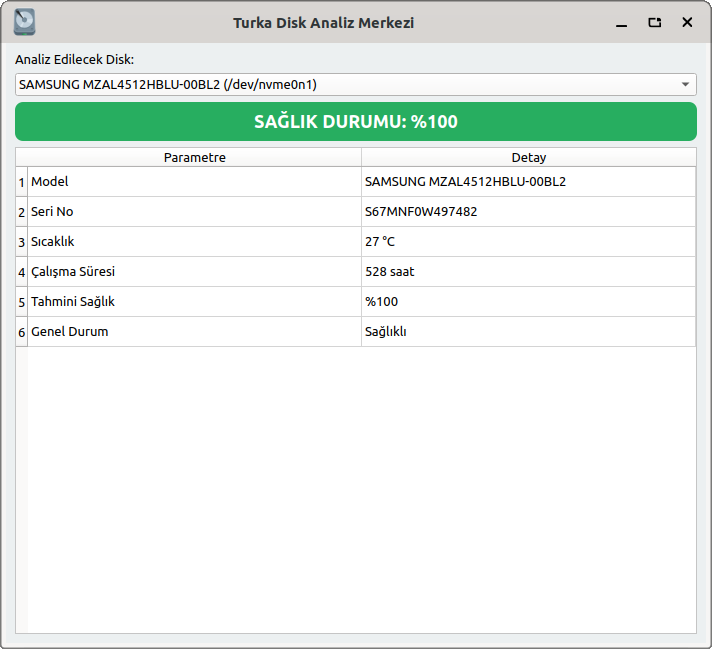
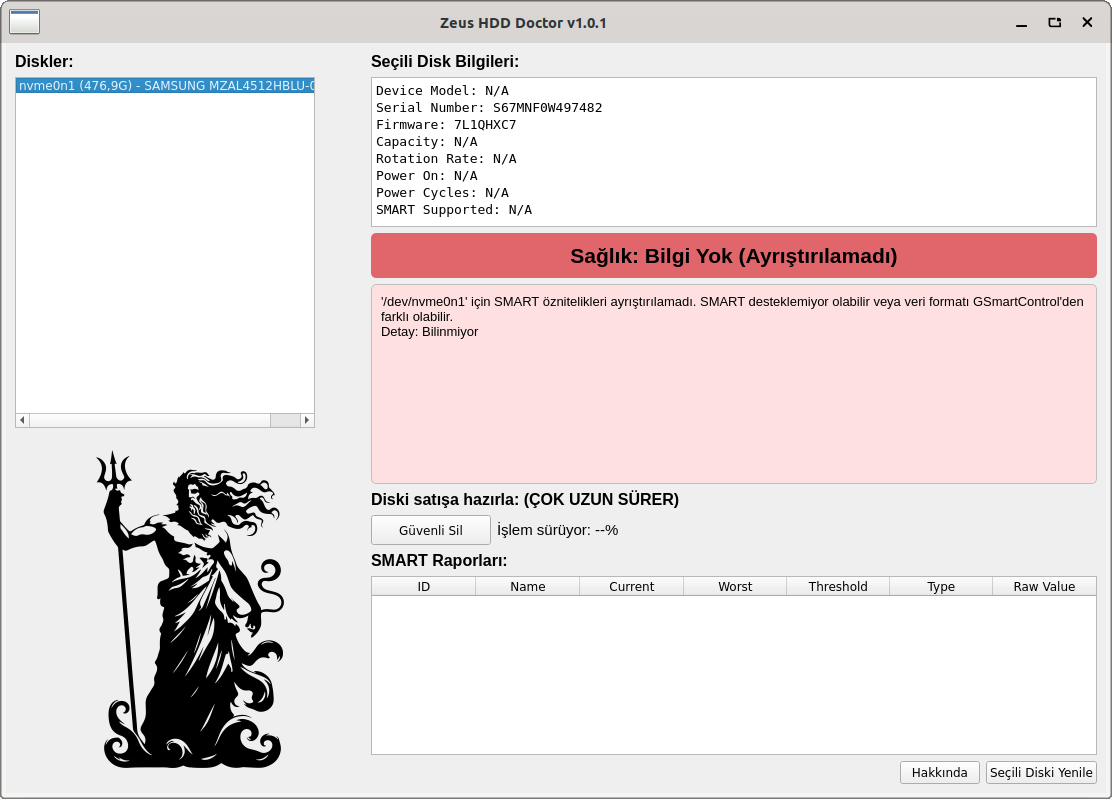
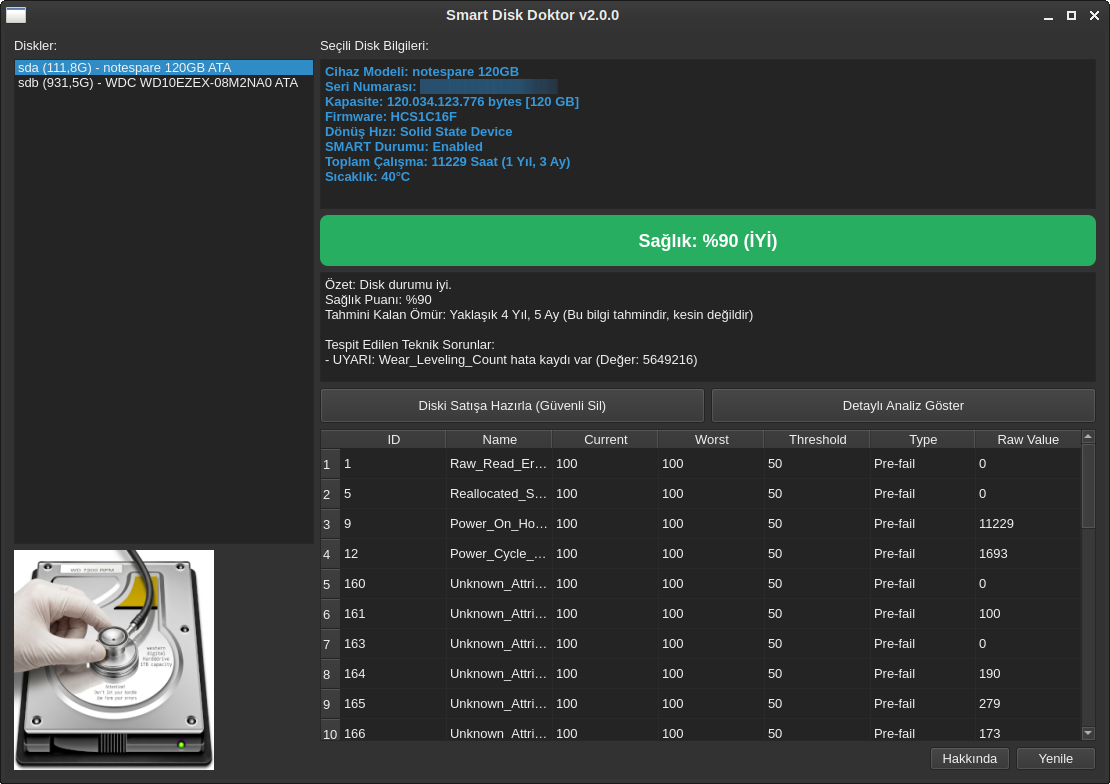
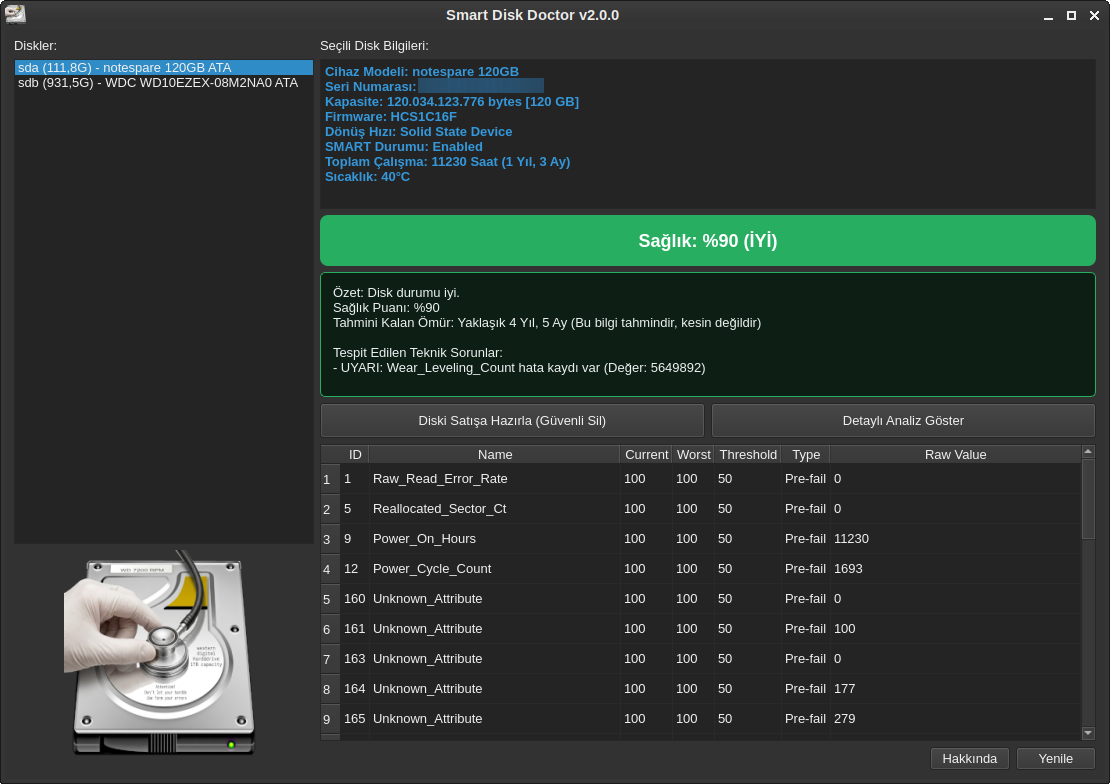
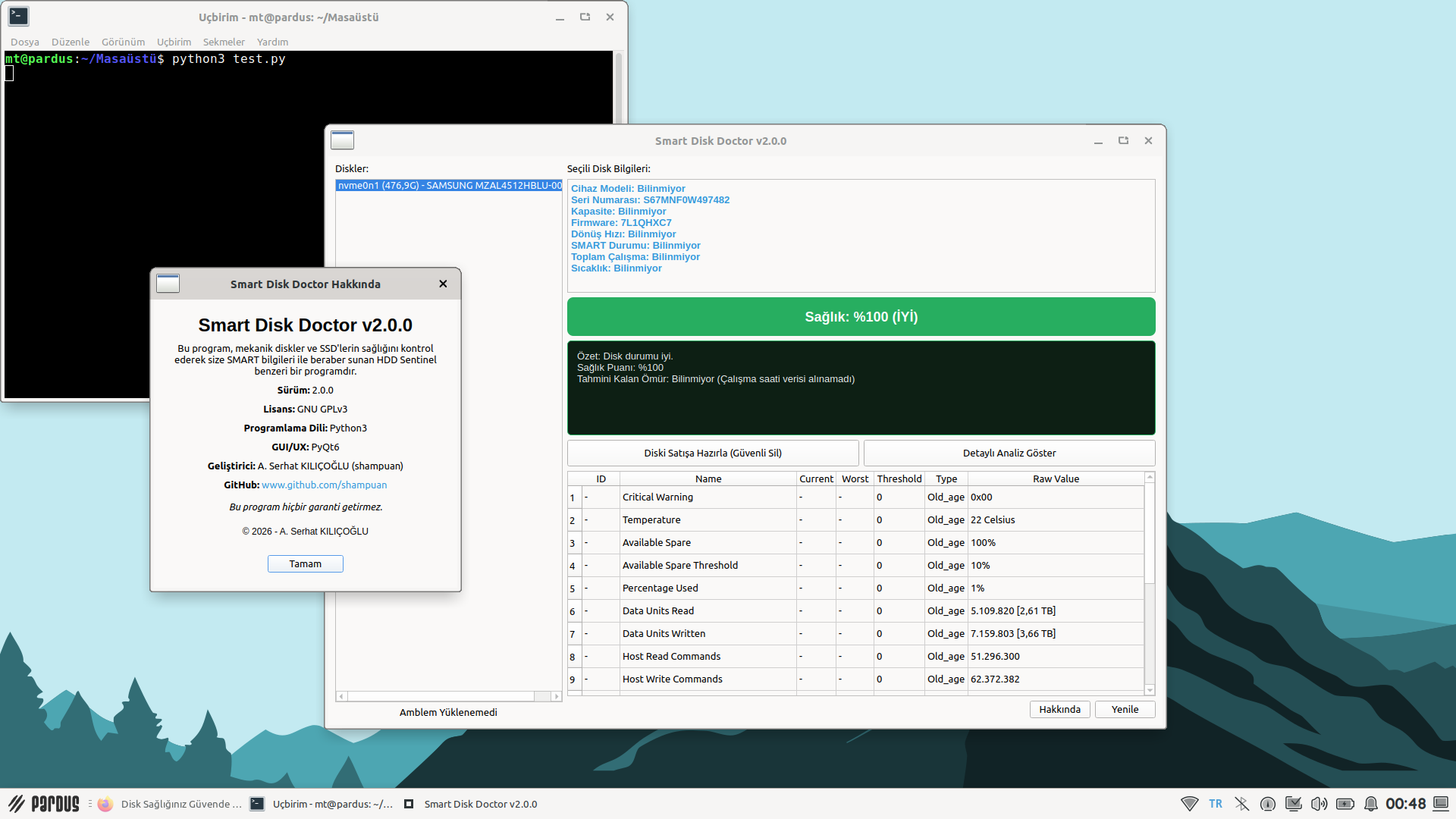
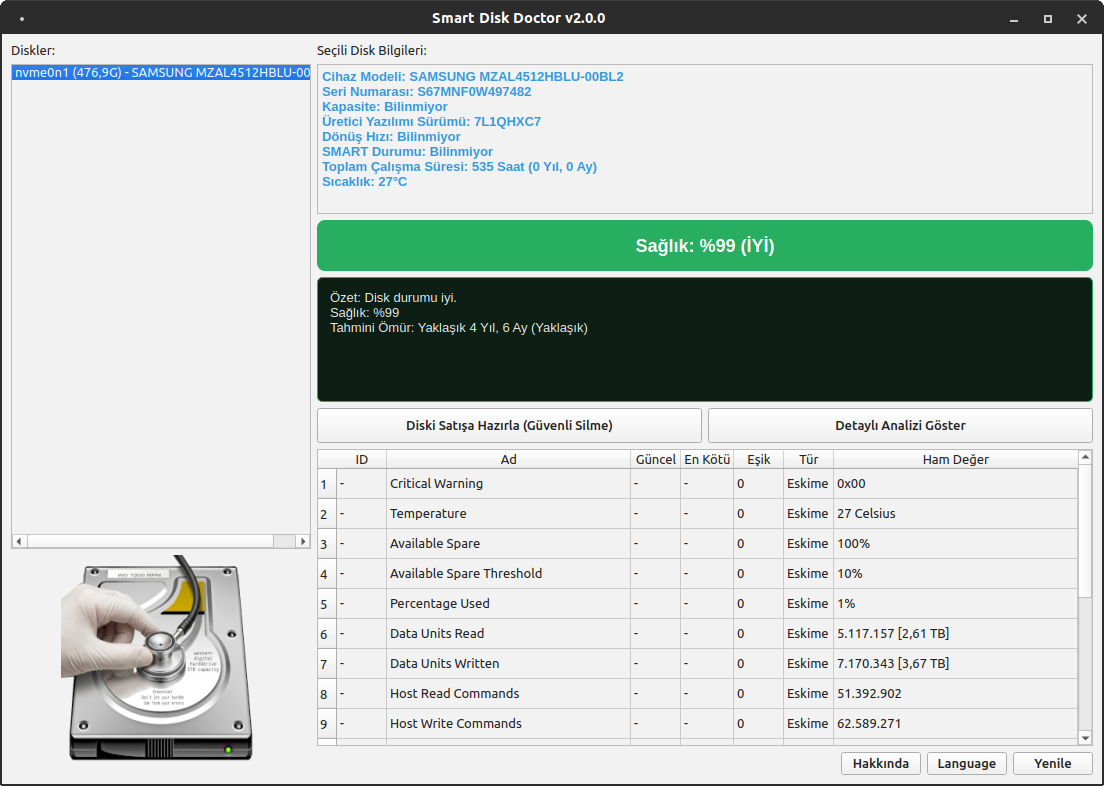
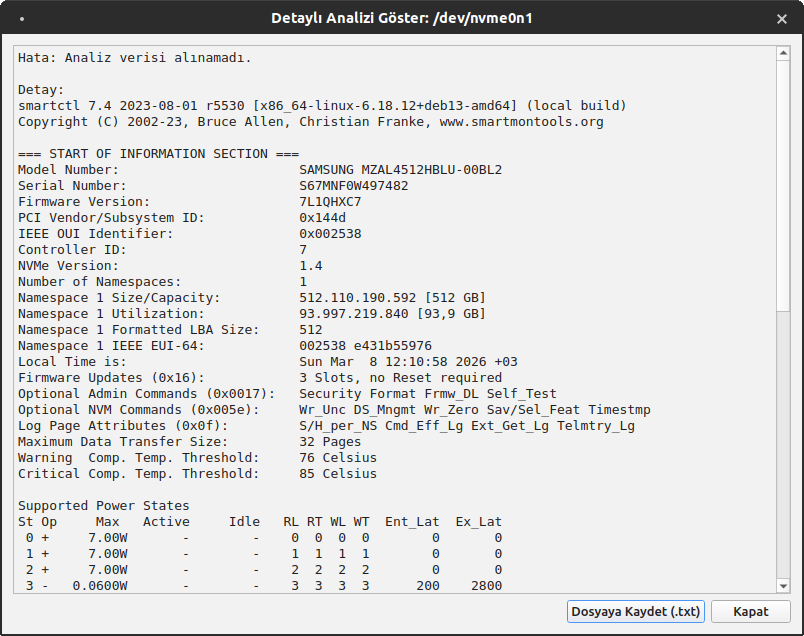
Onu hallettim hocam ben.
Zahmet olmazsa şu kodu deneyebilir misiniz? (pkexec ekranı ile açılır parola sorar).
#!/usr/bin/env python3
# -*- coding: utf-8 -*-
import sys
import subprocess
import os
import re
from PyQt6.QtWidgets import (
QApplication, QMainWindow, QWidget, QVBoxLayout, QHBoxLayout,
QLabel, QPushButton, QTableWidget, QTableWidgetItem, QHeaderView,
QTextEdit, QListWidget, QListWidgetItem, QSizePolicy, QMessageBox,
QDialog, QProgressBar, QGroupBox, QFileDialog
)
from PyQt6.QtGui import QColor, QFont, QPixmap, QIcon
from PyQt6.QtCore import Qt, QTimer, QSize, QProcess
# Linux/Debian tabanlı sistemler için X11 zorlaması
os.environ["QT_QPA_PLATFORM"] = "xcb" # GNOME ortamında sıkıntısız açılması için.
# smartctl ve disk bilgileri ile ilgili fonksiyonlar
def get_disk_list():
"""
Sistemdeki diskleri listeler.
"""
try:
output = subprocess.check_output(['lsblk', '-o', 'NAME,SIZE,TYPE,MODEL,VENDOR', '-n']).decode('utf-8')
disks = []
for line in output.splitlines():
parts = line.strip().split()
if len(parts) >= 3 and parts[2] == "disk":
disk_name = parts[0]
disk_size = parts[1]
model_vendor_parts = parts[3:]
full_model_vendor = " ".join(model_vendor_parts).strip()
full_name = f"{disk_name} ({disk_size}) - {full_model_vendor}".strip()
disks.append({'path': f"/dev/{disk_name}", 'name': full_name})
return disks
except FileNotFoundError:
QMessageBox.critical(None, "Hata", "lsblk komutu bulunamadı. Lütfen yüklü olduğundan emin olun.")
return []
except subprocess.CalledProcessError as e:
error_detail = e.stderr.decode('utf-8').strip() if e.stderr else "Detay yok."
QMessageBox.critical(None, "Hata", f"lsblk komutu çalıştırılırken sorun oluştu: {error_detail}")
return []
def get_smart_data(disk_path):
"""
Belirtilen diskin SMART verilerini smartctl komutu ile alır.
"""
attributes_output = None
info_output = None
error_message = ""
device_types = ['auto', 'sat', 'nvme', 'ata', 'scsi', 'usb']
for dev_type in device_types:
try:
attributes_output = subprocess.check_output(['smartctl', '-A', '-d', dev_type, disk_path], stderr=subprocess.PIPE, timeout=20).decode('utf-8')
info_output = subprocess.check_output(['smartctl', '-i', '-d', dev_type, disk_path], stderr=subprocess.PIPE, timeout=20).decode('utf-8')
if "SMART support is: Disabled" in info_output or "SMART Disabled" in info_output:
error_message = f"Disk '{disk_path}' SMART özelliğini desteklemiyor veya devre dışı."
return None, None, error_message
return attributes_output, info_output, ""
except subprocess.CalledProcessError as e:
error_detail = e.stderr.decode('utf-8').strip() if e.stderr else "Detay yok."
error_message = f"smartctl '{dev_type}' tipiyle '{disk_path}' için çalıştırılamadı. Hata: {error_detail}"
except FileNotFoundError:
error_message = "smartctl komutu bulunamadı. Lütfen smartmontools yüklü olduğundan emin olun."
return None, None, error_message
except Exception as e:
error_message = f"Bilinmeyen bir hata oluştu: {e}"
return None, None, error_message
return None, None, error_message
def parse_smart_attributes(smart_attributes_output):
attributes = []
lines = smart_attributes_output.strip().splitlines()
# NVMe kontrolü: Çıktıda 'NVMe' geçiyorsa farklı bir mantık kullanacağız
is_nvme = any("NVMe" in line for line in lines[:5])
if is_nvme:
for line in lines:
if ":" in line:
parts = line.split(":", 1)
attr_name = parts[0].strip()
raw_value = parts[1].strip()
attributes.append({
"ID": "-",
"Name": attr_name,
"Current": "-",
"Worst": "-",
"Threshold": 0, # NVMe'de eşik değeri kontrolü farklıdır
"Raw_Value": raw_value
})
else:
# Mevcut SATA/ATA tablo okuma mantığı
start_parsing = False
for line in lines:
if "ID#" in line and "ATTRIBUTE_NAME" in line:
start_parsing = True
continue
if start_parsing and line.strip():
parts = line.split()
if len(parts) >= 10:
try:
attributes.append({
"ID": int(parts[0]),
"Name": parts[1],
"Current": int(parts[3]) if parts[3].isdigit() else 0,
"Worst": int(parts[4]) if parts[4].isdigit() else 0,
"Threshold": int(parts[5]) if parts[5].isdigit() else 0,
"Raw_Value": parts[-1]
})
except: continue
return attributes
def parse_smart_info(smart_info_output):
info = {}
lines = smart_info_output.splitlines()
for line in lines:
if ":" in line:
key, val = line.split(":", 1)[0].strip(), line.split(":", 1)[1].strip()
if "Model Family" in key: info["Model Family"] = val
elif "Device Model" in key: info["Device Model"] = val
elif "Serial Number" in key: info["Serial Number"] = val
elif "Firmware Version" in key: info["Firmware Version"] = val
elif "User Capacity" in key: info["User Capacity"] = val
elif "Rotation Rate" in key: info["Rotation Rate"] = val
elif "SATA Version" in key: info["SATA Version"] = val
elif "SMART support is" in key: info["SMART Supported"] = val
return info
def calculate_health_score(attributes, disk_info):
score = 100
critical_map = {
5: 15, 173: 10, 177: 10, 187: 10, 196: 10,
197: 20, 198: 20, 199: 5, 232: 15, 233: 20
}
warnings = []
for attr in attributes:
if attr["Threshold"] > 0 and attr["Current"] <= attr["Threshold"]:
score -= 30
warnings.append(f"KRİTİK: {attr['Name']} eşik değerinin altında!")
attr_id = attr["ID"]
if attr_id in critical_map:
try:
raw_str = str(attr["Raw_Value"]).split()[0]
raw_val = int(''.join(filter(str.isdigit, raw_str))) if any(c.isdigit() for c in raw_str) else 0
if raw_val > 0:
if attr_id == 232 and raw_val >= 10: continue
if attr_id in [173, 233]:
score -= 2
warnings.append(f"BİLGİ: SSD Yıpranma Belirtisi ({attr['Name']})")
else:
score -= critical_map[attr_id]
warnings.append(f"UYARI: {attr['Name']} hata kaydı var (Değer: {raw_val})")
except: pass
score = max(0, min(100, score))
if score >= 90: status = "İYİ"; status_note = "Disk durumu iyi."
elif score >= 75: status = "ORTA"; status_note = "Disk durumu orta. Yedekleme önerilir."
else: status = "KRİTİK"; status_note = "DİKKAT! Acilen yedek alın!"
# --- Saat Bazlı Dürüst Ömür Tahmini ---
power_on_hours = 0
for attr in attributes:
if attr["ID"] == 9:
try:
raw_str = str(attr["Raw_Value"]).split()[0]
power_on_hours = int(''.join(filter(str.isdigit, raw_str)))
except: pass
# disk_info üzerinden SSD/HDD ayrımı
is_ssd = "Solid State" in disk_info.get("Rotation Rate", "")
max_hours = 50000 if is_ssd else 40000
if power_on_hours > 0:
remaining_hours = max(0, max_hours - power_on_hours)
years = int(remaining_hours // 8760)
months = int((remaining_hours % 8760) // 720)
if remaining_hours > 0:
time_str = f"Yaklaşık {years} Yıl, {months} Ay" if years > 0 else f"Yaklaşık {months} Ay"
estimated_life = f"{time_str} (Bu bilgi tahmindir, kesin değildir)"
else:
estimated_life = "Riskli (Beklenen çalışma ömrü sınırı aşıldı)"
else:
estimated_life = "Bilinmiyor (Çalışma saati verisi alınamadı)"
notes = f"Özet: {status_note}\nSağlık Puanı: %{score}\nTahmini Kalan Ömür: {estimated_life}"
if warnings:
notes += "\n\nTespit Edilen Teknik Sorunlar:\n" + "\n".join([f"- {w}" for w in warnings])
return score, status, notes, estimated_life
class AboutDialog(QDialog):
def __init__(self, parent=None):
super().__init__(parent)
self.setWindowTitle("Smart Disk Doctor Hakkında")
self.setMinimumSize(400, 380)
self.init_ui()
def init_ui(self):
layout = QVBoxLayout()
layout.setSpacing(10)
layout.setContentsMargins(20, 20, 20, 20)
title_label = QLabel("Smart Disk Doctor v2.0.0")
title_label.setFont(QFont("Liberation Sans", 18, QFont.Weight.Bold))
title_label.setAlignment(Qt.AlignmentFlag.AlignCenter)
layout.addWidget(title_label)
description = (
"Bu program, mekanik diskler ve SSD'lerin sağlığını kontrol ederek "
"size SMART bilgileri ile beraber sunan HDD Sentinel benzeri bir programdır."
)
desc_label = QLabel(description)
desc_label.setWordWrap(True)
desc_label.setAlignment(Qt.AlignmentFlag.AlignCenter)
layout.addWidget(desc_label)
details_layout = QVBoxLayout()
details = [
"<b>Sürüm:</b> 2.0.0",
"<b>Lisans:</b> GNU GPLv3",
"<b>Programlama Dili:</b> Python3",
"<b>GUI/UX:</b> PyQt6",
"<b>Geliştirici:</b> A. Serhat KILIÇOĞLU (shampuan)",
'<b>GitHub:</b> <a href="https://www.github.com/shampuan" style="color: #3498db; text-decoration: none;">www.github.com/shampuan</a>'
]
for text in details:
lbl = QLabel(text)
lbl.setOpenExternalLinks(True)
lbl.setAlignment(Qt.AlignmentFlag.AlignCenter)
details_layout.addWidget(lbl)
layout.addLayout(details_layout)
guarantee_label = QLabel("<i>Bu program hiçbir garanti getirmez.</i>")
guarantee_label.setAlignment(Qt.AlignmentFlag.AlignCenter)
layout.addWidget(guarantee_label)
copyright_label = QLabel("© 2026 - A. Serhat KILIÇOĞLU")
copyright_label.setFont(QFont("Liberation Sans", 9))
copyright_label.setAlignment(Qt.AlignmentFlag.AlignCenter)
layout.addWidget(copyright_label)
layout.addSpacing(10)
ok_button = QPushButton("Tamam")
ok_button.setFixedWidth(100)
ok_button.clicked.connect(self.accept)
layout.addWidget(ok_button, alignment=Qt.AlignmentFlag.AlignCenter)
self.setLayout(layout)
class SecureEraseDialog(QDialog):
def __init__(self, disk_path, parent=None):
super().__init__(parent)
self.disk_path = disk_path
self.setWindowTitle(f"Diski Güvenli Sil: {self.disk_path}")
self.setMinimumSize(380, 250)
self.shred_process = QProcess(self)
self.shred_process.readyReadStandardError.connect(self.update_progress)
self.shred_process.finished.connect(self.shred_finished)
self.init_ui()
def init_ui(self):
layout = QVBoxLayout(self)
# Bilgilendirme metni
info_text = (
"Bu işlem, HDD'nizi ya da SSD'nizi satışa çıkarmadan evvel, kişisel verilerinizin "
"veri kurtarma programları ile kurtarılarak başkalarının eline geçmemesi için çok gereklidir. "
"Eğer depolama biriminizi satmayı planlıyorsanız, bu işlem kesinlikle gereklidir. "
"Bu işlem, diski baştan sona tarayarak, eski verilerin üzerine yazar ve onları kurtarılamaz hale getirir."
)
info_label = QLabel(info_text)
info_label.setWordWrap(True)
layout.addWidget(info_label)
# Kırmızı uyarı metni
warning_label = QLabel(f"<b>DİKKAT:</b> {self.disk_path} üzerindeki tüm veriler kalıcı olarak silinecektir!")
warning_label.setStyleSheet("color: #c0392b; font-weight: bold;")
warning_label.setWordWrap(True)
layout.addWidget(warning_label)
self.progress_bar = QProgressBar()
layout.addWidget(self.progress_bar)
btn_layout = QHBoxLayout()
self.start_btn = QPushButton("İşlemi Başlat")
self.start_btn.clicked.connect(self.start_shred)
self.stop_btn = QPushButton("Durdur")
self.stop_btn.setEnabled(False)
self.stop_btn.clicked.connect(self.stop_shred)
btn_layout.addWidget(self.start_btn)
btn_layout.addWidget(self.stop_btn)
layout.addLayout(btn_layout)
def start_shred(self):
self.start_btn.setEnabled(False)
self.stop_btn.setEnabled(True)
self.shred_process.start('shred', ['-v', '-n', '1', self.disk_path])
def stop_shred(self):
if self.shred_process.state() == QProcess.ProcessState.Running:
self.shred_process.terminate()
self.stop_btn.setEnabled(False)
self.start_btn.setEnabled(True)
QMessageBox.warning(self, "Durduruldu", "İşlem kullanıcı tarafından kesildi.")
def update_progress(self):
data = self.shred_process.readAllStandardError().data().decode(errors='ignore')
found = re.findall(r'(\d+)%', data)
if found:
self.progress_bar.setValue(int(found[-1]))
def shred_finished(self):
self.progress_bar.setValue(100)
self.start_btn.setEnabled(True)
self.stop_btn.setEnabled(False)
QMessageBox.information(self, "Tamamlandı", "Güvenli silme işlemi başarıyla bitti.")
class DetailedAnalysisDialog(QDialog):
def __init__(self, disk_path, parent=None):
super().__init__(parent)
self.disk_path = disk_path
self.setWindowTitle(f"Detaylı SMART Analizi: {self.disk_path}")
self.setMinimumSize(800, 600)
self.init_ui()
self.run_analysis()
def init_ui(self):
layout = QVBoxLayout(self)
self.output_text = QTextEdit()
self.output_text.setReadOnly(True)
self.output_text.setFont(QFont("Monospace", 10))
layout.addWidget(self.output_text)
btn_layout = QHBoxLayout()
self.save_button = QPushButton("Dosyaya Kaydet (.txt)")
self.save_button.clicked.connect(self.save_to_file)
close_button = QPushButton("Kapat")
close_button.clicked.connect(self.accept)
btn_layout.addStretch()
btn_layout.addWidget(self.save_button)
btn_layout.addWidget(close_button)
layout.addLayout(btn_layout)
def run_analysis(self):
try:
# Program zaten root/sudo yetkisiyle çalıştığı için tekrar 'sudo' demeye gerek yok.
# Bazı sistemlerde 'sudo' etkileşimli terminal beklediği için hata verebilir.
output = subprocess.check_output(['smartctl', '-a', self.disk_path], stderr=subprocess.STDOUT).decode('utf-8')
self.output_text.setText(output)
except subprocess.CalledProcessError as e:
# Hata çıktısını da metin kutusuna yazdırarak sorunu anlamayı kolaylaştırıyoruz.
error_msg = e.output.decode('utf-8') if e.output else str(e)
self.output_text.setText(f"Hata: Analiz verisi alınamadı.\n\nDetay:\n{error_msg}")
except Exception as e:
self.output_text.setText(f"Bilinmeyen bir hata oluştu:\n{e}")
def save_to_file(self):
from PyQt6.QtWidgets import QFileDialog
file_path, _ = QFileDialog.getSaveFileName(self, "Analizi Kaydet", f"smart_analiz_{self.disk_path.replace('/', '_')}.txt", "Metin Dosyaları (*.txt)")
if file_path:
content = self.output_text.toPlainText()
# Windows uyumlu satır sonları (CRLF) ile kaydetme
with open(file_path, 'w', encoding='utf-8', newline='\r\n') as f:
f.write(content)
QMessageBox.information(self, "Başarılı", "Analiz raporu Windows uyumlu formatta kaydedildi.")
class ZeusHDDDoctor(QMainWindow):
def __init__(self):
super().__init__()
self.setWindowTitle("Smart Disk Doctor v2.0.0")
self.setGeometry(100, 100, 1100, 750)
self.shred_process = QProcess(self)
self.shred_process.readyReadStandardError.connect(self.update_shred_progress)
self.shred_process.finished.connect(self.shred_finished)
self.shred_process.errorOccurred.connect(self.shred_error_occurred)
self.stderr_buffer = ""
# Uygulama ikonu atama (Dinamik yol ile)
base_path = os.path.dirname(os.path.abspath(__file__))
icon_path = os.path.join(base_path, "smartdocicon.png")
if os.path.exists(icon_path):
self.setWindowIcon(QIcon(icon_path))
self.init_ui()
self.load_disks()
def init_ui(self):
central_widget = QWidget()
self.setCentralWidget(central_widget)
main_layout = QHBoxLayout(central_widget)
left_panel = QVBoxLayout()
left_panel.addWidget(QLabel("Diskler:"), 0)
self.disk_list_widget = QListWidget()
self.disk_list_widget.setFixedWidth(300)
self.disk_list_widget.itemClicked.connect(self.on_disk_selected)
left_panel.addWidget(self.disk_list_widget, 1)
self.zeus_logo_label = QLabel()
# Betiğin olduğu dizini bul ve amblem ismini yanına ekle
base_path = os.path.dirname(os.path.abspath(__file__))
logo_path = os.path.join(base_path, "smartdoctor.png")
pixmap = QPixmap(logo_path)
if not pixmap.isNull():
self.zeus_logo_label.setPixmap(pixmap)
self.zeus_logo_label.setScaledContents(True)
self.zeus_logo_label.setFixedSize(200, 220)
else:
self.zeus_logo_label.setText("Amblem Yüklenemedi")
self.zeus_logo_label.setAlignment(Qt.AlignmentFlag.AlignCenter)
left_panel.addStretch()
left_panel.addWidget(self.zeus_logo_label, alignment=Qt.AlignmentFlag.AlignCenter)
main_layout.addLayout(left_panel)
right_panel = QVBoxLayout()
self.disk_details_text = QTextEdit()
self.disk_details_text.setReadOnly(True)
self.disk_details_text.setFixedHeight(150)
right_panel.addWidget(QLabel("Seçili Disk Bilgileri:"))
right_panel.addWidget(self.disk_details_text)
self.health_status_label = QLabel("Sağlık: N/A")
self.health_status_label.setFont(QFont("Liberation Sans", 16, QFont.Weight.Bold))
self.health_status_label.setAlignment(Qt.AlignmentFlag.AlignCenter)
self.health_status_label.setStyleSheet("")
right_panel.addWidget(self.health_status_label)
self.notes_text = QTextEdit()
self.notes_text.setFixedHeight(125)
self.notes_text.setReadOnly(True)
right_panel.addWidget(self.notes_text)
# Diski Satışa Hazırla (Güvenli Silme) Çerçevesi
from PyQt6.QtWidgets import QGroupBox, QProgressBar
# Butonlar için yatay bir yerleşim
action_btn_layout = QHBoxLayout()
self.secure_erase_nav_button = QPushButton("Diski Satışa Hazırla (Güvenli Sil)")
self.secure_erase_nav_button.setFixedHeight(35)
self.secure_erase_nav_button.clicked.connect(self.open_secure_erase_dialog)
self.detailed_analysis_button = QPushButton("Detaylı Analiz Göster")
self.detailed_analysis_button.setFixedHeight(35)
self.detailed_analysis_button.clicked.connect(self.show_detailed_analysis)
action_btn_layout.addWidget(self.secure_erase_nav_button)
action_btn_layout.addWidget(self.detailed_analysis_button)
right_panel.addLayout(action_btn_layout)
self.attributes_table = QTableWidget()
self.attributes_table.setColumnCount(7)
self.attributes_table.setHorizontalHeaderLabels(["ID", "Name", "Current", "Worst", "Threshold", "Type", "Raw Value"])
# Sütun genişliklerini içeriğe ve ihtiyaca göre özelleştirme
header = self.attributes_table.horizontalHeader()
# ID, Current, Worst, Threshold ve Type gibi kısa veriler için içeriğe göre daraltma
header.setSectionResizeMode(0, QHeaderView.ResizeMode.ResizeToContents) # ID
header.setSectionResizeMode(2, QHeaderView.ResizeMode.ResizeToContents) # Current
header.setSectionResizeMode(3, QHeaderView.ResizeMode.ResizeToContents) # Worst
header.setSectionResizeMode(4, QHeaderView.ResizeMode.ResizeToContents) # Threshold
header.setSectionResizeMode(5, QHeaderView.ResizeMode.ResizeToContents) # Type
# Name ve Raw Value gibi uzun açıklamalar için esnetme (Stretch)
header.setSectionResizeMode(1, QHeaderView.ResizeMode.Stretch) # Name
header.setSectionResizeMode(6, QHeaderView.ResizeMode.Stretch) # Raw Value
right_panel.addWidget(self.attributes_table, 1) # 1 değeri tablonun esnemesini sağlar
btn_layout = QHBoxLayout()
self.about_button = QPushButton("Hakkında")
self.about_button.clicked.connect(self.show_about_dialog)
self.refresh_button = QPushButton("Yenile")
self.refresh_button.clicked.connect(self.refresh_selected_disk)
btn_layout.addStretch()
btn_layout.addWidget(self.about_button)
btn_layout.addWidget(self.refresh_button)
right_panel.addLayout(btn_layout)
main_layout.addLayout(right_panel, 1)
def load_disks(self):
self.disk_list_widget.clear()
self.disks = get_disk_list()
for disk in self.disks:
item = QListWidgetItem(disk['name'])
item.setData(Qt.ItemDataRole.UserRole, disk['path'])
self.disk_list_widget.addItem(item)
if self.disks:
self.disk_list_widget.setCurrentRow(0)
self.on_disk_selected(self.disk_list_widget.currentItem())
def on_disk_selected(self, item):
if item: self.display_disk_data(item.data(Qt.ItemDataRole.UserRole))
def refresh_selected_disk(self):
# Önce sistemdeki güncel disk listesini yükle (Yeni takılan cihazlar için)
self.load_disks()
# Sonra seçili olan (veya yeniden yüklenen) diskin verilerini tazele
item = self.disk_list_widget.currentItem()
if item:
self.display_disk_data(item.data(Qt.ItemDataRole.UserRole))
def show_about_dialog(self):
AboutDialog(self).exec()
def open_secure_erase_dialog(self):
item = self.disk_list_widget.currentItem()
if not item:
QMessageBox.warning(self, "Hata", "Lütfen önce bir disk seçin.")
return
disk_path = item.data(Qt.ItemDataRole.UserRole)
dialog = SecureEraseDialog(disk_path, self)
dialog.exec()
def show_detailed_analysis(self):
item = self.disk_list_widget.currentItem()
if not item:
QMessageBox.warning(self, "Hata", "Lütfen önce bir disk seçin.")
return
disk_path = item.data(Qt.ItemDataRole.UserRole)
dialog = DetailedAnalysisDialog(disk_path, self)
dialog.exec()
def initiate_secure_erase(self):
item = self.disk_list_widget.currentItem()
if not item: return
path = item.data(Qt.ItemDataRole.UserRole)
reply = QMessageBox.warning(self, "ONAY", f"{path} SİLİNECEK! Emin misiniz?",
QMessageBox.StandardButton.Yes | QMessageBox.StandardButton.No)
if reply == QMessageBox.StandardButton.Yes:
self.secure_erase_button.setEnabled(False)
# -n 1: Sadece 1 kez rastgele veri yaz (Hızlı ve güvenli)
self.shred_process.start('shred', ['-v', '-n', '1', path])
def update_shred_progress(self):
# Okunan veriyi decode et ve tampona ekle
data = self.shred_process.readAllStandardError().data().decode(errors='ignore')
self.stderr_buffer += data
# En güncel yüzde bilgisini bul
found_percentages = re.findall(r'(\d+)%', self.stderr_buffer)
if found_percentages:
last_percent = found_percentages[-1]
self.progress_bar.setValue(int(last_percent))
# Tamponun aşırı büyümesini engellemek için son kısmı tutalım
if len(self.stderr_buffer) > 1000:
self.stderr_buffer = self.stderr_buffer[-500:]
def shred_finished(self, exit_code, exit_status):
self.secure_erase_button.setEnabled(True)
self.progress_bar.setValue(100)
QMessageBox.information(self, "Bilgi", "İşlem tamamlandı.")
def shred_error_occurred(self, error):
self.secure_erase_button.setEnabled(True)
QMessageBox.critical(self, "Hata", f"İşlem hatası: {error}")
def display_disk_data(self, disk_path):
attr_out, info_out, err = get_smart_data(disk_path)
if attr_out and info_out:
self.disk_details_text.clear() # Yenilenme hissi için kutuyu boşalt
self.disk_details_text.setStyleSheet("color: #3498db; font-weight: bold;") # Hoş bir mavi tonu
attrs = parse_smart_attributes(attr_out)
info = parse_smart_info(info_out)
score, status, notes, life = calculate_health_score(attrs, info)
# Tablo verilerinden saat ve sıcaklığı çekiyoruz
# Saat bilgisini al ve Yıl/Ay formatına çevir
raw_poh = next((a['Raw_Value'] for a in attrs if a['ID'] == 9), None)
if raw_poh and str(raw_poh).isdigit():
hours = int(raw_poh)
years = hours // 8760
months = (hours % 8760) // 720
poh_text = f"{hours} Saat ({years} Yıl, {months} Ay)"
else:
poh_text = "Bilinmiyor"
# Sıcaklık bilgisini al ve birim ekle
raw_temp = next((a['Raw_Value'] for a in attrs if a['ID'] == 194 or a['ID'] == 190), None)
temp_text = f"{raw_temp}°C" if raw_temp else "Bilinmiyor"
# Orijinal canlı renk tonlarını geri yüklüyoruz
if score >= 85:
color = "#27ae60" # Canlı Yeşil
bg_color = "#0d1f14" # Çok Koyu Yeşil
elif score >= 70:
color = "#f1c40f" # Canlı Sarı
bg_color = "#241e02" # Çok Koyu Sarı/Kahve
elif score >= 60:
color = "#e67e22" # Canlı Turuncu
bg_color = "#261505" # Çok Koyu Turuncu
else:
color = "#c0392b" # Canlı Kırmızı
bg_color = "#1f0a08" # Çok Koyu Kırmızı
self.health_status_label.setText(f"Sağlık: %{score} ({status})")
self.health_status_label.setStyleSheet(f"""
background-color: {color};
color: white;
font-weight: bold;
border-radius: 8px;
padding: 15px;
font-size: 18px;
""")
self.notes_text.setText(notes)
self.notes_text.setStyleSheet(f"""
background-color: {bg_color};
color: #ecf0f1;
border: 1px solid {color};
border-radius: 5px;
padding: 8px;
""")
details = (f"Cihaz Modeli: {info.get('Device Model', 'Bilinmiyor')}\n"
f"Seri Numarası: {info.get('Serial Number', 'Bilinmiyor')}\n"
f"Kapasite: {info.get('User Capacity', 'Bilinmiyor')}\n"
f"Firmware: {info.get('Firmware Version', 'Bilinmiyor')}\n"
f"Dönüş Hızı: {info.get('Rotation Rate', 'Bilinmiyor')}\n"
f"SMART Durumu: {info.get('SMART Supported', 'Bilinmiyor')}\n"
f"Toplam Çalışma: {poh_text}\n"
f"Sıcaklık: {temp_text}")
self.disk_details_text.setPlainText(details)
# self.disk_details_text.setText(details)
self.attributes_table.setRowCount(len(attrs))
for i, a in enumerate(attrs):
self.attributes_table.setItem(i, 0, QTableWidgetItem(str(a['ID'])))
self.attributes_table.setItem(i, 1, QTableWidgetItem(a['Name']))
self.attributes_table.setItem(i, 2, QTableWidgetItem(str(a.get('Current', '-'))))
self.attributes_table.setItem(i, 3, QTableWidgetItem(str(a.get('Worst', '-'))))
self.attributes_table.setItem(i, 4, QTableWidgetItem(str(a.get('Threshold', 0))))
self.attributes_table.setItem(i, 5, QTableWidgetItem("Pre-fail" if a.get('Threshold', 0) > 0 else "Old_age"))
self.attributes_table.setItem(i, 6, QTableWidgetItem(str(a['Raw_Value'])))
else:
self.disk_details_text.setStyleSheet("color: #c0392b;") # Hata durumunda kırmızı yap
self.health_status_label.setText("HATA")
self.notes_text.setText(err)
if __name__ == "__main__":
# Sistem varsayılan ölçeklendirmesini kullan
# Bu özelliği devre dışı bıraktım ki sistem temasına göre uyarlansın.
if os.geteuid() != 0:
# Mevcut ekran (Display) ve yetki (XAuthority) bilgilerini alıyoruz
display_var = os.environ.get('DISPLAY')
xauth_var = os.environ.get('XAUTHORITY')
script_path = os.path.abspath(sys.argv[0])
# pkexec'e bu değişkenleri paslıyoruz ki root ekranı açabilsin
command = ['pkexec', 'env',
f'DISPLAY={display_var}',
f'XAUTHORITY={xauth_var}',
sys.executable, script_path] + sys.argv[1:]
try:
subprocess.run(command, check=True)
sys.exit(0)
except Exception as e:
print(f"Yetkilendirme hatası: {e}")
sys.exit(1)
# Sistem temasını (GTK/Dark) zorlamak için argüman listesine platform temasını ekliyoruz
# Bu yöntem, çevre değişkenlerinden daha baskındır.
sys_args = sys.argv + ['-platformtheme', 'gtk3']
app = QApplication(sys_args)
app.setFont(QFont("Liberation Sans", 10))
# Qt6'nın sistemdeki renk şemasını (koyu/açık) otomatik algılaması için
app.setStyle("Fusion")
os.environ["QT_QUICK_CONTROLS_STYLE"] = "Fusion"
window = ZeusHDDDoctor()
window.show()
sys.exit(app.exec())
Bir sıkıntı çıkarsa haber verin.
 Diskinizin tahmini sağlık durumunu % olarak görebilir,